TeCoEd (Teaching Computing Education)
  • Home
    • Freelance
    • Book
    • Downloading
  • Python
    • Learn Python >
      • Python Modules
    • PyGame Zero
    • Python Programs >
      • Higher or Lower
      • Magic Calculator
      • Password Checker
      • Python Pit
    • What's News App
    • Pixels to Cells
    • Python Mosaics
    • Python OCR
    • L-1-AM
    • Web Scraping >
      • Scraping Trains
    • Weather App
    • Snakes and Windows
    • Python Web Server >
      • Flask
    • Python Picks
  • Ras Pi
    • All About the Pi
    • Getting Started
    • Remote Desktop and VNC
    • Static IP Address
    • Sonic Pi >
      • 3.14
    • Twitter Feed >
      • Tweepy
    • Android & Pi >
      • Advanced Apps
      • Odds
    • A.I on the the Pi
    • CRON
    • Pick Your Own
  • Pi Hardware
    • Pi HATS >
      • Sense Hat Hacks
      • AstroPi HAT
      • Unicorn-HAT >
        • Unicorn Alphabet Disco
        • Uni Codes / Programs
      • Skywriter
      • Piano HAT
    • STS Pi
    • Pi Camera >
      • Pi-Cam, Python & Email >
        • Time Lapse
      • Pi Noir
    • Pipsta >
      • Flask, Input & Printers
    • Raspberry Pi Power >
      • Energenie IR power
    • Pibrella
    • Distance Sensor
    • LCD Screen
    • Pi-Tooth
    • Robot Arm
    • PiGlow
    • PiFM
    • Accelerometer
    • PiFace >
      • Installing PiFace >
        • Python Commands
  • Pi-Hacks
    • Drone Hacks
    • Pi Glue Gun Hack
    • Blinkt!
    • Sonic Pixels
    • R2D2
    • Get to the chopper
    • Astro Bird
    • Twitter Translator
    • Hacking a Robot
    • Nature_Box >
      • Best Nature Photos
    • Wearable Tech >
      • Project New York
      • P.N.Y Part 2 Health
      • P.N.Y Part 3 Games
      • P.N.Y Part 4 Translation
    • Dino-Tweet
    • Other Links
  • Pi-Hacks 2
    • The Joker
    • Hologram Machine
    • Google Vision: Camera Tell
    • Yoda Tweets
    • Pi Phone
    • Darth Beats
    • Twitter Keyword Finder
    • Crimbo Lights Hack
    • Xmas Elf
    • Halloween 2016
    • Halloween Hack 2015
    • Socrative Zombie
    • Voice Translation
    • The Blue-Who Finder
    • GPIO, Twitter
    • Pi Chat Bot >
      • Dictionary Definitions
    • PiGlow & Email
    • Pibrella Alarm System
    • SMS with Python >
      • Spooking a Mobile
  • Pi-Hacks 3
    • LED Dance Suit
    • Ferminal
    • Crypto Tracker
    • David Bowie
    • Lamp Prank >
      • TEST
    • Yoda FM
    • Retro Player
    • LED Pixel Art
    • TARDIS
    • Battleships
    • LED Board
    • Night Vision
    • Enviro+ Weather
  • Minecraft
    • Minecraft API
    • Minecraft Sweeper
    • PiGlove: Minecraft Power Up
    • Minecraft Photo-booth
    • Rendering Pixels
    • Speed Cube
    • Lucky Dip
  • Computing
    • Why Computing?
    • Can You Compute
    • micro:bit
    • Coding Resources
    • Learn to Code >
      • Coding with iPads
      • Apps Creation Tools
      • sKratchInn
      • Sound Editing
    • Cheat Sheets
    • Theory
    • HOUR OF CODING
    • BEBRAS Computing Challange
    • Computer Facts
    • Free Software and Links
  • Contact Me
  • Random Hacks
    • Movile

PI PROJECTS: SMS with Python 


What is it?


Picture
This simple python program will allow you to send an SMS or text message from your Raspberry Pi.  It can then be incorporated into other programs or even text you every time your Ras.Pi. boots up.

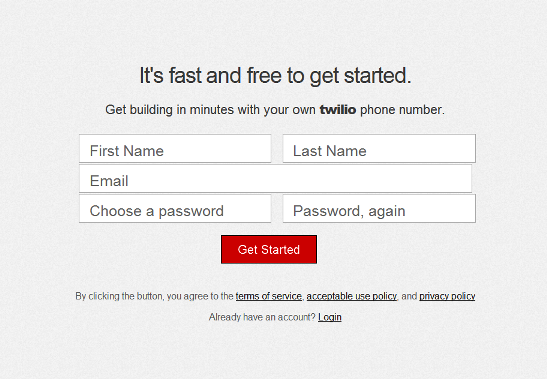
Sign up for an Account


First you need to register your phone for a Twilio account and Twilio number.  This is free but will only allow you to send SMS to and from the registered phone.  You will receive a verification code via SMS to the registered phone.  When promoted enter this onto the Twilio site to authenticate your account and phone.
Picture
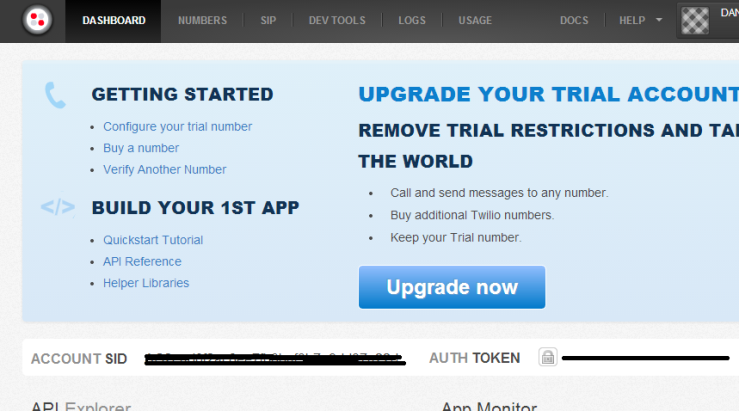
Next visit the Dashboard page which will display your Account SID and your AUTH. Token.  Keep these safe and private but, make a note of these for the Python program.
Picture

How To:


Connect and Boot up your Raspberry Pi, In the LX Terminal :

Update your Pi     
sudo apt-get update

Upgrade your Pi    
sudo apt-get upgrade

Next install the Twilio Python module
sudo easy_install twilio OR sudo pip install twilio

Open Python IDLE and type the following code, a modified version of the program is available at the end for your to download.

from twilio.rest import TwilioRestClient
account_sid = "XXXXXXXXXXXXXXXXXXXXXXXXXXXXX" # Enter Yours
auth_token = "XXXXXXXXXXXXXXXXXXXXXXXXXX" #Enter Yours
client = TwilioRestClient(account_sid, auth_token)
message = client.messages.create(to="+44mobilephonenumber", from_="+44yourtwilionumber",
                                     body="Hello there!")
print message.sid

Because your Twilio account is a trial account you can only send and receive from the validated phone number

Replace the XXXXXXX with your SID code and AUTH. Token.  Save with a suitable file name for example send_sms.  Remember also to use +44 and remove the 0 before the beginning of the phone numbers. 

To run, open the LX terminal sudo python send_sms.py 

Depending on your mobile phone reception, you should receive your text in a within a few minutes 

Code to send any SMS message: Download here

Coming Soon
  • Makey Makey Banana SMS
  • Replying to as SMS
Powered by Create your own unique website with customizable templates.
